Get an Extra month Subscription for Free - Refer A friend - ask for details

Best BC TV Streams
Best BC TV Streams
  • Home
  • ABOUT US
  • PRICES
    • Ultimate 1 Device
    • Ultimate 2 Devices
    • Ultimate 3 Devices
    • Ultimate 4 Devices
    • Devices W/Subscription
  • DEVICES & SUBSCRIPTION
  • TUTORIALS
    • DEVICE SETUP
    • QUICK TIVIMATE FIXES
    • HELP VIDEOS
    • PLAYER DOWNLOADS
  • FAQ
  • TRIAL
  • WORLD CHANNELS
    • CANADA-US-UK
    • LATINO-INDIA-FRANCE
    • PORTUGAL-SPAIN-ITALY
    • BELIUM-GERMAY-ARABIC
    • CZECH-ISRAEL-BULGARIA
    • RU-UA-NO-NL-PL-IR
    • AM-GR-TU-AL-EX-EG-DEN-MA-
    • MT-MU-IR-SI-MK-AR-ONS
    • RO-HU-PK-BO-TH-IN-LI-FI-P
    • DK-PH-SE-UAE-SK-MYHD
  • More
    • Home
    • ABOUT US
    • PRICES
      • Ultimate 1 Device
      • Ultimate 2 Devices
      • Ultimate 3 Devices
      • Ultimate 4 Devices
      • Devices W/Subscription
    • DEVICES & SUBSCRIPTION
    • TUTORIALS
      • DEVICE SETUP
      • QUICK TIVIMATE FIXES
      • HELP VIDEOS
      • PLAYER DOWNLOADS
    • FAQ
    • TRIAL
    • WORLD CHANNELS
      • CANADA-US-UK
      • LATINO-INDIA-FRANCE
      • PORTUGAL-SPAIN-ITALY
      • BELIUM-GERMAY-ARABIC
      • CZECH-ISRAEL-BULGARIA
      • RU-UA-NO-NL-PL-IR
      • AM-GR-TU-AL-EX-EG-DEN-MA-
      • MT-MU-IR-SI-MK-AR-ONS
      • RO-HU-PK-BO-TH-IN-LI-FI-P
      • DK-PH-SE-UAE-SK-MYHD
  • Sign In
  • Create Account

  • My Account
  • Signed in as:

  • filler@godaddy.com


  • My Account
  • Sign out

Signed in as:

filler@godaddy.com

  • Home
  • ABOUT US
  • PRICES
    • Ultimate 1 Device
    • Ultimate 2 Devices
    • Ultimate 3 Devices
    • Ultimate 4 Devices
    • Devices W/Subscription
  • DEVICES & SUBSCRIPTION
  • TUTORIALS
    • DEVICE SETUP
    • QUICK TIVIMATE FIXES
    • HELP VIDEOS
    • PLAYER DOWNLOADS
  • FAQ
  • TRIAL
  • WORLD CHANNELS
    • CANADA-US-UK
    • LATINO-INDIA-FRANCE
    • PORTUGAL-SPAIN-ITALY
    • BELIUM-GERMAY-ARABIC
    • CZECH-ISRAEL-BULGARIA
    • RU-UA-NO-NL-PL-IR
    • AM-GR-TU-AL-EX-EG-DEN-MA-
    • MT-MU-IR-SI-MK-AR-ONS
    • RO-HU-PK-BO-TH-IN-LI-FI-P
    • DK-PH-SE-UAE-SK-MYHD

Account

  • My Account
  • Sign out

  • Sign In
  • My Account

Quick fixes for Tivimate errors & Adding Playlist

All Tivimate Simple Fixes

How to Fix EPG not working

All Tivimate Simple Fixes

Tivimate fixes

  • make sure you have the latest version 5.2.0
  • Make sure your Wi-Fi is working or internet connection
  • Unplug your router for 30 seconds to clear the cache
  • Go into your app settings on your streaming device and go to Tivimate App
  • Click force stop
  • Click clear cache ( do not clear data)
  • Go into back into Tivimate settings 
  • Click update Playlist
  • Unplug device and plug back in
  • Make sure your subscription hasn't expired
  • To check -  Go into Tivimate settings
  • Click on the playlist-Go halfway down and click-Extreme Code Parameters
  • That will tell you everything you need to know about your subscription including the expiry date at the bottom


Exception Error Quick Fix

How to Fix EPG not working

All Tivimate Simple Fixes

If you get this error code follow these steps to repair this issue .


You need to add a USER AGENT

  • Getting error code an error occurred "HttpDataSourceException"


  •  Clear tivimate Cache
  • In your Firestick or Android box -  Go to settings 
  • 1.Go to Apps Clear tivimate Cache
  • 2.Click on Tivimate app
  • 3.click clear cache
  • 4.go to Tivimate settings
  • 5.click General
  • 6.go down to User Agent
  • 7.click on it
  • 8.add "VLC"
  • 9.click next (make sure you see the VLC)
  • 10.restart device
  • 11. you might need to change the server address if the issues   is not resolved


How to Fix EPG not working

How to Fix EPG not working


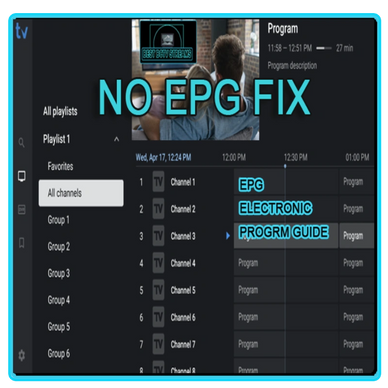
HOW TO GET YOUR EPG (ELECTRONIC PROGRAM GUIDE) WORKING

1. Go into Tivimate settings

2. Click on EPG

3. Click on EPG sources

4. Click on add sources- add all the URL sources provided with your subscription

5. Click on the URL you are usingand click Default on

6. Click the back button – click on playlist- click on your playlist that you are using http://***.com

7. Click below the playlist -EPG Sources- toggle on all the sources

8. Click back button

9. Click on EPG-click clear EPG at the bottom-click update EPG

10. If that doesn’t work

11. Go to apps on your device

12. Click on Tivimate

13. Click force stop

14. Click clear cache- do not click clear data (you will wipe it clean)

15. Unplug your device and restart it

How to Add a new Playlist or additional Playlist

  • How to add your new Playlist In Tivimate 
  • Go to settings
  • Playlist 
  • Add Playlist 
  • Extreme Codes
  • Enter your Server address (URL)
  • URL  http://    **********
  • USERNAME     **********
  • PASSWORD     **********
  • Click next and let it load


You will need to add your favorites again


Tivimate- How To Change Server address Only!

In Tivimate - Go to settings 

  • playlist 
  • click on the playlist
  • go down to Extreme Code Parameters
  • Enter your new Server address 
  • URL  http://    *line.rs6 only if changing server
  • USERNAME     ********** use existing
  • PASSWORD     **********use existing
  • Click next 
  • Click Apply changes
  • click back to playlist 
  • You need to also change the name of the old playlist so they don't conflict


Tivimate- How To fix Buffering Problems


  • In Tivimate App
  • Click on Settings
  • click on Playback
  • default buffer size is set to small
  • Change the buffer size to large
  • you will need to have Tivimate Premium unlock to change any Tivimate settings


Tivimate- what causes Buffering Problems

Tivimate- what causes Buffering Problems

Tivimate- what causes Buffering Problems


What Causes Buffering in TiviMate?

  • Slow or unstable internet connection
  • Overloaded IPTV server
  • Incorrect TiviMate settings
  • Device performance issues
  • ISP throttling or restrictions

-----------------------------------------------------------

 Use a VPN to Avoid being Throttled by ISP(Internet Service Provider)


The TiviMate buffering issue could simply be because the government or your Internet Service Providers has restricted the content you are attempting to stream in your geographical location.


 ISPs are notorious for throttling internet speed when they detect that you are using a third-party app, such as TiviMate for streaming. 

-----------------------------------------------------------

 Buffering can frustrate and disappoint you when you are watching an exciting movie scene. It’s Tivimate where we all watch live TV. Here, real-time viewing is crucial, so this is more of a disappointment. 


Players & VPN downloads

Tivimate 5.2.0 download
XC IPTV Download
IpVanish Download
Snmarters Pro Download
  • Tivimate 5.2.0 download
  • XC IPTV Download
  • IpVanish Download
  • Snmarters Pro Download
  • Tivimate 5.2.0 download
  • XC IPTV Download

Copyright © 2026 Best BC TV Streams - All Rights Reserved -

  Refund Policy - Privacy Policy

  • Ultimate 1 Device
  • Ultimate 2 Devices
  • Ultimate 3 Devices
  • Ultimate 4 Devices
  • DEVICES & SUBSCRIPTION
  • QUICK TIVIMATE FIXES
  • HELP VIDEOS
  • PLAYER DOWNLOADS

Powered by

This website uses cookies.

We use cookies to analyze website traffic and optimize your website experience. By accepting our use of cookies, your data will be aggregated with all other user data.

Accept